1. The status: available in Japan now
Muse launched in Japan on October 23, 2026. Japan is the first country outside North America to get Muse: the United States launched on September 8, 2026, Canada followed on September 18, 2026, and Japan joins the list about five weeks later. Meta announced the launch on the day itself, and the Muse app went live in the Japanese App Store and on Google Play the same day.
Japan also matters if you are reading from somewhere else in Asia. It is the first launch in the region, and until today Meta had not named a single Asian country for Muse. A launch in Japan does not promise a date for anyone else, and Meta has announced none, but it proves the rollout has left North America. If your country is still waiting, the waitlist is how you hear about it the day it happens.
The launch is a big one. More than ten million people set up Muse in the United States and Canada in its first weeks, and Japan is the first test of the agent outside North America. We track every launch as it happens on the full list of Muse available countries, and everything below is the Japan chapter: how to get in, what it costs, and what to do first.
2. How to get Muse in Japan
Getting Muse in Japan takes a few minutes, and the download is free on every device.
- On iPhone: open the App Store, search for Muse by Meta, download the app, open it and sign in. The app needs a recent version of iOS, so update your phone first if the download is refused.
- On Android: open Google Play, search for Muse by Meta, install it, open it and sign in.
- On a computer: open muse.ai in your browser and sign in. The web version does the same work as the apps.
During setup you can connect the services Muse works with, starting with Gmail and Google Calendar, and you can give instructions by text or by voice. You need to be 18 or older to use Muse. If the app does not appear in your store yet, check that your store account region is set to Japan and try again later in the day, because launches roll out in stages and the listing can take hours to reach every account.
Two setup choices are worth making on day one. First, connect the accounts you actually live in, because an agent that can see your real inbox and calendar is useful in a way a blank one is not. Second, try a voice instruction early, on a small task, so you learn how Muse checks back with you before it acts. Approvals are the habit that makes an agent safe to give bigger work, and the first day is when the habit forms.
3. What Muse costs in Japan
The basic version of Muse is free. Downloading the app and using the core features costs nothing, and that free tier is the full starting point: conversations, connected email and calendar, and everyday tasks.
Meta also offers paid subscription plans for people who want more usage, the same pattern as in the United States and Canada. Meta did not publish Japan specific prices in its launch announcement, so check the plan screen inside the app for the current yen prices before you subscribe to anything. Nothing about the free tier requires a card, and you can use Muse properly before you ever see a plan screen.
4. What Muse does with Japanese services
A launch is only as good as the services the agent can actually use, and Japan starts with a local lineup from day one.
- Gmail and Google Calendar, today. Connect them and Muse can summarise your unread email, manage your schedule, and keep both current as you talk to it.
- Klook, from launch day. Travel experiences on Klook can be searched, compared and booked inside a Muse conversation, with payment confirmed by you at the end. Klook announced the integration alongside the Japan debut.
- Mercari and Money Forward ME, coming soon. Masahiro Ajisawa, the head of Meta in Japan, said Meta plans to connect Muse with the services people use regularly, and named the flea market app Mercari and the finance app Money Forward ME as connections on the way.
- Your approval stays in the loop. Muse asks before it sends an email or pays for anything, and it cannot see your passwords or your card details. You choose which apps and which information it can reach, and you can change that in Settings at any time.
For most people in Japan the everyday shape of Muse will be simple: a summary of the morning inbox, a calendar that stays current, questions answered by voice on the move, and bookings handled in one conversation instead of five apps. The local connections are what turn that from a demo into a routine, which is why the Mercari and Money Forward arrivals are worth watching. When they land, this page will say so.
5. Once you are in: turn this setting off
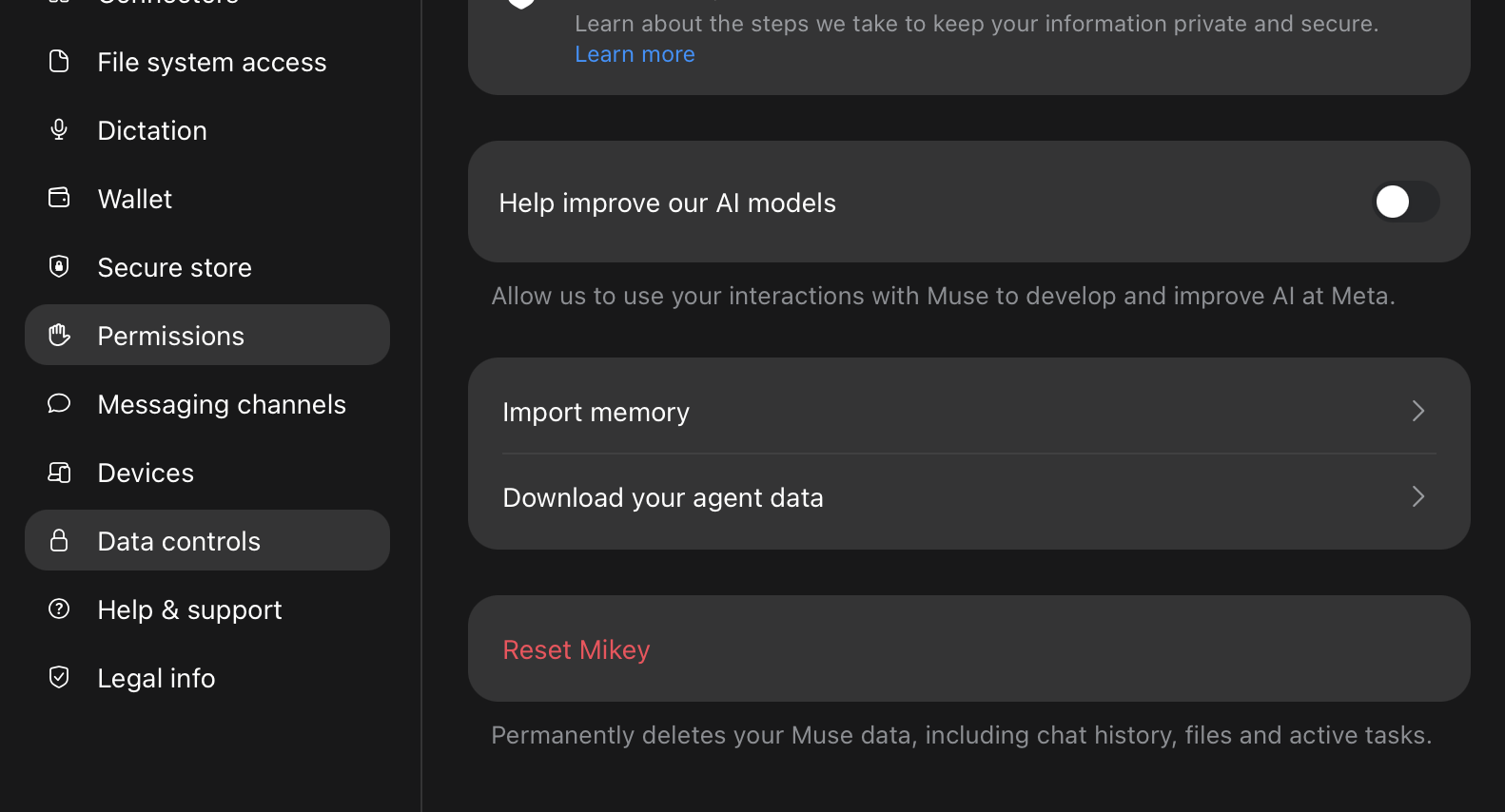
Do this before anything else. Open the Muse app, go to Settings, then Data controls, and turn off Help improve our AI models. That switch controls whether Meta may use your chats to train future models.
One more thing to know before you start sharing your work: Meta has paused the sharing of Muse chats and artifacts while it reviews how share links can be discovered, a change it announced on October 20, 2026 and explained in our guide to the sharing pause. If you build something in Japan worth showing, publish it as a workflow or artifact here on Built with Muse, where people can actually find it.
6. Do you need an invite code in Japan?
The download is public, and codes still matter. Access in the launch countries runs on invite codes, and many members are asked for one during setup, so if the app shows you an invite screen, take a free code from the community pool on the homepage and carry on. Once you are in, you receive invites of your own. Pass them to friends in the countries still waiting, or share them back into the pool so a stranger gets their start the way you got yours.
Get started
Built something with Muse? Be one of the first to publish your Muse workflow here. Share what you built and become the person people follow.
Explore workflows Publish a workflowReading from a country still waiting? Join the waitlist and get a code the day Muse launches there.
Frequently asked questions
- Is Muse available in Japan?
- Yes. Muse launched in Japan on October 23, 2026, the first country outside North America to get it. The United States launched on September 8, 2026 and Canada followed on September 18, 2026.
- How do I get Muse in Japan?
- Download the free Muse app from the App Store or Google Play in Japan, or open muse.ai in a browser and sign in. Setup takes a few minutes, and you can connect Gmail and Google Calendar during setup or later in Settings.
- How much does Muse cost in Japan?
- The basic version is free, including the app download and the core features. Paid subscription plans are offered for heavier use, and Meta has not published Japan specific prices in its launch announcement, so check the plan screen inside the app for the current yen prices.
- Do I need an invite code for Muse in Japan?
- The download itself is public, and many members are still asked for a code during setup in the launch countries. If the app asks, a free code from the community pool on this site covers it, and once you are in you can pass your own invites to friends in countries still waiting.
- Which Japanese services does Muse connect to?
- Gmail and Google Calendar connect today, and Klook travel experiences can be booked inside Muse from launch day. Meta says connections to Mercari and Money Forward ME are coming soon, as part of linking Muse with the services people in Japan use every day.
- Which privacy setting should I turn off?
- In the Muse app, go to Settings, then Data controls, and turn off Help improve our AI models. That switch controls whether Meta may use your chats to train future models.
Built with Muse is an independent community project. Not affiliated with or endorsed by Meta.